New features in Ellié Computing Merge 2.5
Toolbar/Menu flying by the current item
Merging with a single click and mostly wihout moving the cursor is possible thanks to the toolbar and menu flying by the current conflict. ECMerge places in this toolbar most appropriate actions.
Secure Shell/SSH FTP (SFTP)
ECMerge can compare the folders shared through SFTP (SSH FTP). ECMerge supports password authentication as well as private key and can integrate with ssh-agent or pageant (the key manager for putty). Of course, you can update and compare an SFTP site as you wish (with other folders connected through whichever protocol).
ActiveX
The latest ActiveX version of ECMerge now supports systems with the data execution prevention enabled (NX flag). It supports all the features of the standalone version. It integrates to your application, your scripts or web site thanks to the ActiveX technology. It can e.g. generate a patch between two strings of text and obtain the result as a string as well, all of that with or without user interface.
Since version 2.5, ECMerge ActiveX is available as 64 bits and a 32 bits build, you can thus integrate it into any Windows applications. ECMerge can be now considered script-safe when host constraints are expressed inside the DSA signed key: you can host ECMerge in your website with no annoying messages.
You can try it now in your web browser with the on-line demonstration page.
Easy install on Linux
The installation process under Linux exists now in three flavours: a Debian package, a RPM file and the compressed archive. The Debian package is typically installed in a single clic once downloaded on a machine with Debian, Ubuntu... The RPM files are more suited to Fedora and RedHat. Of course, there is still the compressed archive to install in your own user directory for more flexibility.
Compare Binary Files
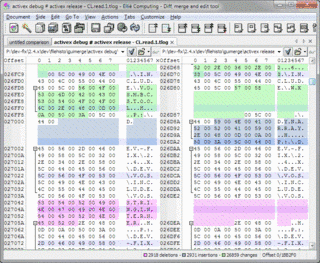
ECMerge can now compare binary files. It presents differences in clear manner, its speed is impressing and it can collapse long portions of equal sequence of bytes. As with text files, it is possible to ignore portions of files to avoid spurious differences between build timestamps or random filling data for example. Read more...
Opens text conflict files
Resolving the conflicts let behind by CVS, Subversion or Mercurial (complete list) is not a really practical task: text markers and special notations are inserted to keep track of the conflicts and it is easy to miss one of them. ECMerge completely releaves that pain by parsing these markers and presenting a usual two or three-way merge view, you can then solves the conflicts within the comfort of ECMerge powerful interface! More info...
Git connectivity
ECMerge allows you to access the content of your Git repository, either local in your work directory or in "bare" repository and as well via SSH (always bare repostory in this case). The access "Git over SSH" requires PuTTY on Windows and ssh on OS X and Linux to realize the authentication.
You can access any commit per hexadécimal code, date, label and branch. The folders can be listed and the files content read. Your repository must encode accents in UTF-8.
ECMerge can be used from Git to compare and merge code source, and compare images, binary or office text documents.
Launcher
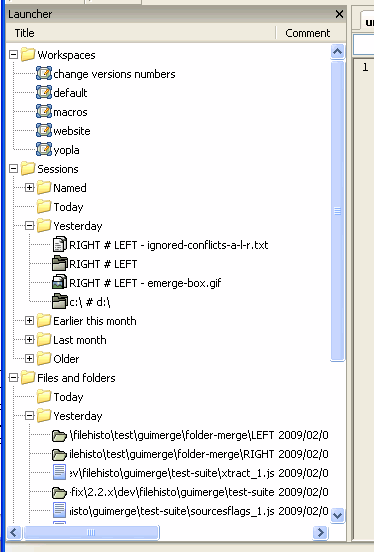
From the launcher, you can register the addresses for your favorite sites, then reuse them with a double-clic or drag'n'drop.
Comparison sessions are automatically saved each time that you close a comparison (which has no ECMS/T file).
With the launcher, it takes just a second to start again a comparison... better, the workspace allow you to organize and restart your work by opening again all your files and comparisons with a single double-click (or at ECMerge start-up).