Compare Binary Files
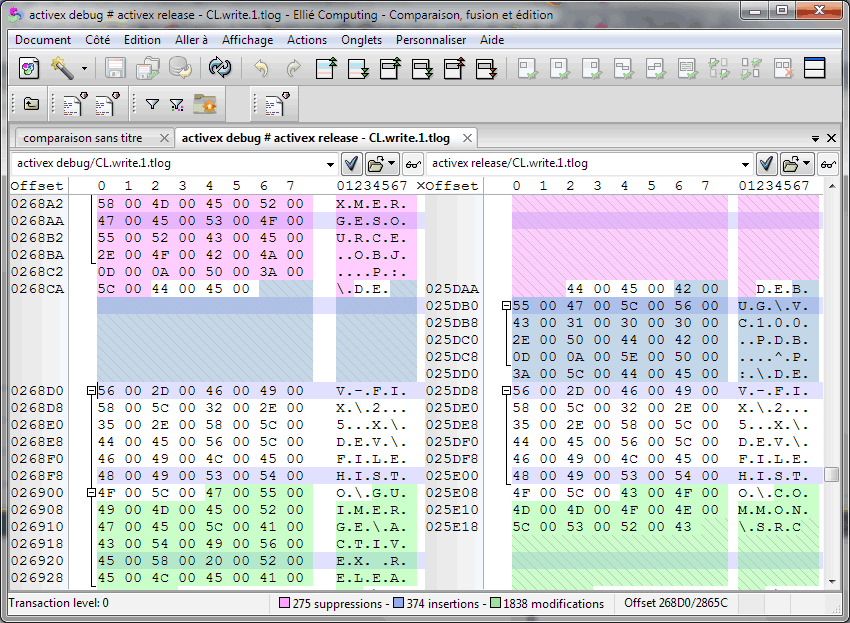
Ellié Computing Merge compares and displays differences between binary files. Each side of the display is built from two columns: the hexadecimal column is organised as an array of bytes and the text column represents ASCII/CP1252 characters meaning for each byte.
ECMerge computes differences in parallel of the user interface so that computing differences for very large files does not block the interface (tests are executed on files as large as 7GB). ECMerge compares the binary files at a rate of several megabytes per second on a typical processor (around 2GHz).
ECMerge can compute differences with or without resynchronization. Identical data are always presented in front of each other. ECMerge can hide long portions with a single behaviour ( identical, inserted or different) so as to focus on important data.
ECMerge handles binary formats which provide it with ignorable fields (such as build timestamp or filling random data), it allows you to verify repeatability of your build for example (the PE File format is provided).
See also: ECMerge documentation: Binary Comparison
|