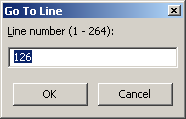
Sets the cursor at the specified position in a text
file
This dialog box appears when you type Ctrl+G or select the
Go To / Go To Line...menu. It enables you to move to a
specific line in a text document (Text Editor or Text
Comparison) by giving its number.
Enter the line number where you want to cursor to be set and
click on
OK. The control shows the range of numbers you
can use.
Press
F1 while in this dialog box will show this
topic.